

Guide d'utilisation
Notes panel
Keep a trading journal with a rich editor.
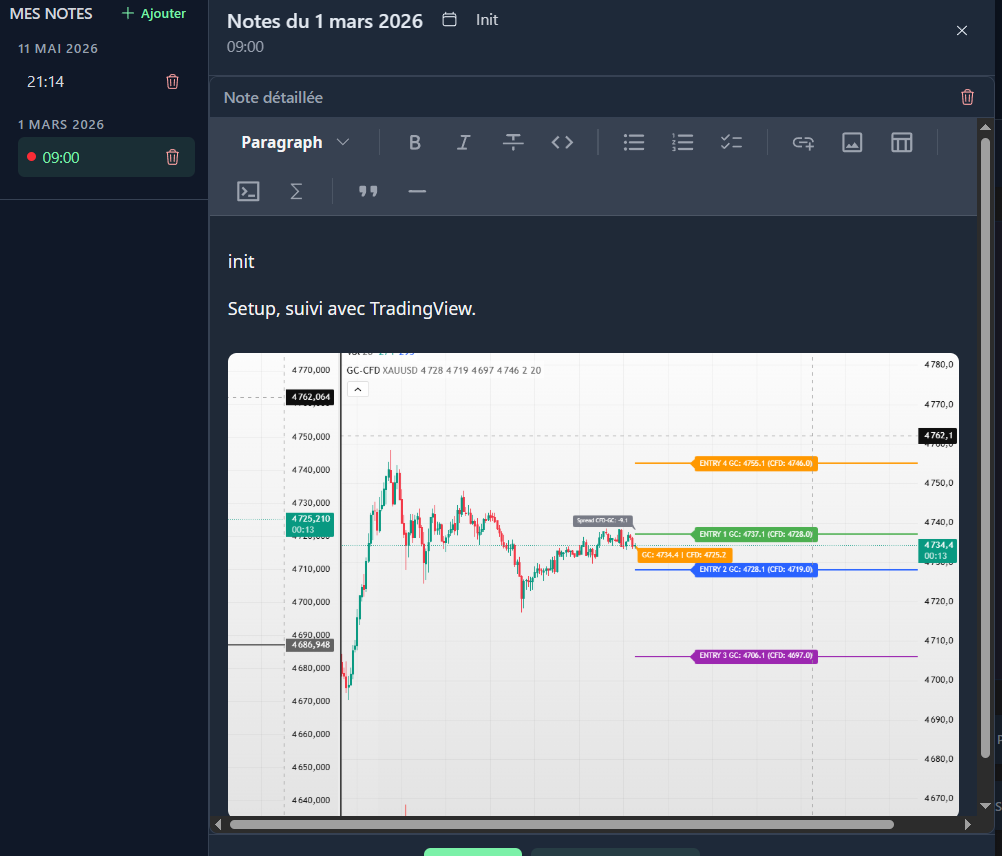
The notes panel is a Markdown WYSIWYG editor (Milkdown) that lets you keep a detailed trading journal with images and formatting.
Open the panel
In the daily view, click the Notes button to slide the panel from the left.
Notes list
The panel displays:
- All dates having at least one note
- Under each date: the list of notes with their time
- Modification indicator: red dot if the active note is not saved
Milkdown editor
The editor supports:
- Headings (
#,##,###) - Bold/italic text
- Bullet and numbered lists
- Links
- Tables
- Images (drag-and-drop or paste)
- Code blocks
Insert an image
Drag-and-drop an image directly into the editor, or paste it from the clipboard. The image is uploaded and stored automatically.
Create a note
- Click "+" at the top of the panel, choose the time + title
- Write your note in the editor
- Save (Ctrl+S)
You can also create a detailed note for each individual trade in the daily view. Open a trade and click the note icon to add a journal specific to that trade. This complements the tag system and the simple note already associated with the trade.
Delete a note
Click the trash icon to the right of the note in the list. A confirmation is requested.